eLearn
  • Home
  • Calendar
  • Schools
    APPLIED BUSINESS
    ARCHITECTURE
    BRIDGEPOINT
    BUILDING CONSTRUCTION
    CIVIL ENGINEERING AND LAND SURVEYING
    COMMUNITY STUDIES
    COMPUTING, ELECTRICAL AND APPLIED TECHNOLOGY
    CREATIVE INDUSTRIES
    ENVIRONMENTAL AND ANIMAL SCIENCES
    HEALTHCARE AND SOCIAL PRACTICE
    TRADES AND SERVICES
    Tuapapa Rangahau and Postgraduate Resources
    Unitec Pathways College
    All departments
  • Students
    ONLINE TOOLS MyPortfolio guide MyUnitec Portal Student Email Outlook Ask IMS Ask IMS orientation
    STUDY SUPPORT ACADEMIC INTEGRITY Library International Maia Maori Student Central (Te Pae Korero) Student Learning and Achievement Study Toolbox The Pacific Centre
    OTHER SERVICES Career and Study Options CAREER & EMPLOYABILITY Clubs and Sports Health and Safety Reporting Counselling Services Student Reps Student Advocates Scholarships and Awards
  • Staff
    ELEARNING AI Literacy for Learners Generative AI for Teachers Digital Learning Standards Echo 360 Flexible L&T H5P Interactive Activities MyPortfolio SEAtS Staff Guide to Moodle Zoom for Teachers
    OTHER Academic Quality Badges (Teaching Competencies) Collaborative Spaces Moodle role induction Request a new Moodle course Te Rito Suite
  • More
Site-wide search Close
Toggle search input
English ‎(en)‎
Afrikaans ‎(af)‎ Deutsch ‎(de)‎ English ‎(en)‎ Español - Internacional ‎(es)‎ Filipino ‎(fil)‎ Français ‎(fr)‎ Māori Te Reo ‎(mi)‎ Tagalog ‎(tl)‎
You are currently using guest access
Log in
eLearn
Home Calendar Schools Collapse Expand
APPLIED BUSINESS ARCHITECTURE BRIDGEPOINT BUILDING CONSTRUCTION CIVIL ENGINEERING AND LAND SURVEYING COMMUNITY STUDIES COMPUTING, ELECTRICAL AND APPLIED TECHNOLOGY CREATIVE INDUSTRIES ENVIRONMENTAL AND ANIMAL SCIENCES HEALTHCARE AND SOCIAL PRACTICE TRADES AND SERVICES Tuapapa Rangahau and Postgraduate Resources Unitec Pathways College All departments
Students Collapse Expand
ONLINE TOOLS MyPortfolio guide MyUnitec Portal Student Email Outlook Ask IMS Ask IMS orientation STUDY SUPPORT ACADEMIC INTEGRITY Library International Maia Maori Student Central (Te Pae Korero) Student Learning and Achievement Study Toolbox The Pacific Centre OTHER SERVICES Career and Study Options CAREER & EMPLOYABILITY Clubs and Sports Health and Safety Reporting Counselling Services Student Reps Student Advocates Scholarships and Awards
Staff Collapse Expand
ELEARNING AI Literacy for Learners Generative AI for Teachers Digital Learning Standards Echo 360 Flexible L&T H5P Interactive Activities MyPortfolio SEAtS Staff Guide to Moodle Zoom for Teachers OTHER Academic Quality Badges (Teaching Competencies) Collaborative Spaces Moodle role induction Request a new Moodle course Te Rito Suite

Guide to Moodle

Back

Enrolment - Automatic enrolment

By using the PeopleSoft code, you can let PeopleSoft automatically enrol your students into your Moodle course. They will be enrolled one week before the PeopleSoft course start date, and unenrolled two weeks after the PeopleSoft course end date.

If you need them in longer than these dates, please email yliu@unitec.ac.nz with the course code and the new requested start and end dates.

Instructions:

  1. Course Administration block > Edit settings
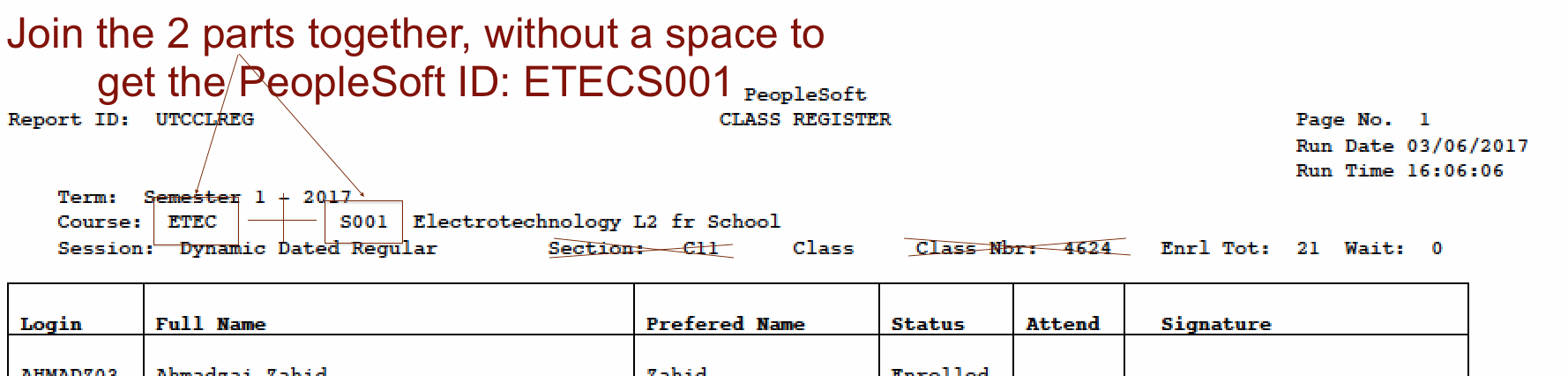
  2. Enter the PeopleSoft course code in the PeopleSoft ID field
  3. Click "Save changes" at the bottom

NB: Only one course on Moodle can use the same PeopleSoft ID.


Course enrolment or Programme enrolment?

Moodle Peoplesoft ID field can accept either the Peoplesoft Course or Programme code.

A Peoplesoft course code is PeopleSoft Subject + PeopleSoft Category (ie. APMG8099). There is no space between them. The wrong ID will enrol the wrong students or none!


The list of all Programmes and their PeopleSoft IDs can be found here.

» Guide to Moodle
Contact site support
You are currently using guest access (Log in)
Data retention summary
Powered by Moodle